Clarity-Driven Development: For Humans & AI
Coding Might Now Be Cheap, But Thinking Is Still Your Job
This article is still very much work in progress; more details on the practical example will be added over time.
When I attended my first computer science class in 2009, programming—writing text that makes a computer do something—felt like a magical superpower. But over the years, as I shifted towards designing larger systems, typing out the necessary code to materialize these systems started to feel more and more like a chore. That’s why I’ve been really excited when, around Nov/Dec 2025, AI coding agents finally reached a point where they produced code I didn’t feel I had to refactor from top to bottom—and suddenly software development became fun again.
In this article, I want to give a glimpse into how I personally use AI to develop software (as of early 2026). But more importantly, I want to explain what I don’t let AI do: the conceptual work that happens before I start coding—with or without AI—and which gives me the confidence that the software is actually worth building in the first place. I call this approach Clarity-Driven Development (CDD), which you can also read more about in my latest book, Clarity-Driven Development of Scientific Software.
CDD is a thinking framework for gaining clarity on the problem and designing technology-agnostic solutions, creating a solid foundation whether you’re implementing software yourself or directing AI.
Where Humans Are Still in the Loop
AI—more specifically, generative AI in the form of large language models (LLMs)—is now available both through web-based chat tools like ChatGPT and through more autonomous agents like Claude Code. These systems can support us in different ways, with varying levels of oversight (Figure 1).

While vibe coding may be appropriate for throwaway prototypes, so far I still lean toward the “human control” end of the spectrum. That said, as models improve, I’m increasingly surprised by the quality of AI-generated code and find myself manually verifying less and less—while still having guardrails in place: tests, type checking, linting, and similar feedback loops that also help AI agents validate their own work before calling a task done.
In that respect, I found that working with an AI agent feels a lot like working with a newly hired colleague. At first, you watch their output closely—who knows, maybe they oversold themselves in the interview, just like marketing promises and flashy AI hype posts don’t exactly mirror reality. But over time, as they repeatedly deliver, trust grows and the need for detailed checks drops (assuming you’re not a micromanaging control freak who already scared away their best people).
But even your most capable colleagues can only deliver high-quality work if you provide them with enough context and clearly describe the outcome you want. By that I don’t mean prescribing specific steps they need to follow (“first do X, then Y, then Z”)—humans value autonomy over how they accomplish their tasks, and modern AIs are capable of figuring out these steps themselves. But you do need to provide a clear definition of done. And CDD helps you achieve exactly that: define the result you envision so your colleague—human or AI—has a real chance of delivering something you’ll be happy with.
This also means the spectrum in Figure 1 is too one-dimensional. Human control is exerted in two steps (Figure 2): when providing the input to the AI (by writing more specific prompts) and when reviewing and manually correcting the AI’s output.
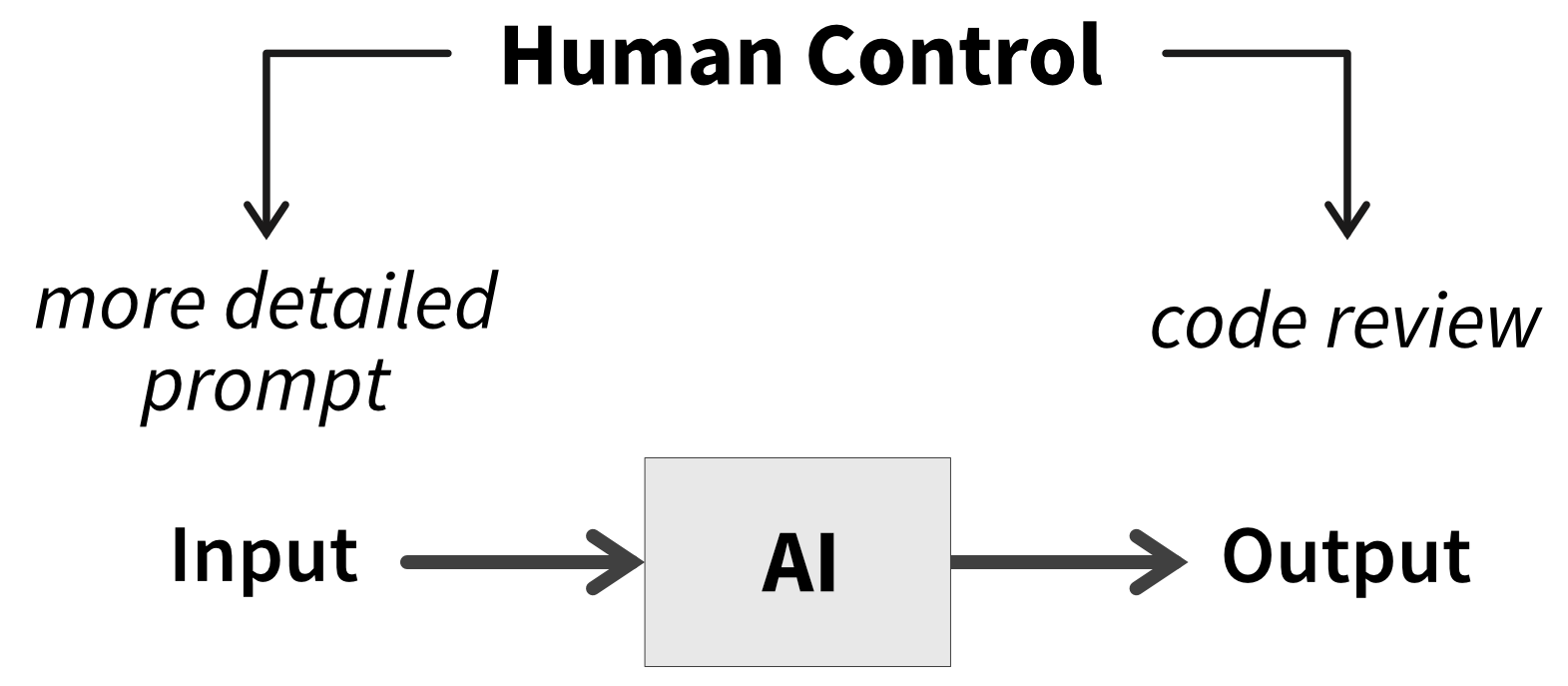
My hope is that the second step eventually disappears—that I can some day trust AI-generated code the way I trust compiler output. I’m perfectly happy, however, to keep full control on the input side. I still want to think through the problem and gain clarity about what it is I actually want to build. Now, I’m not saying this process won’t also involve AI—it can actually be a great sounding board for your ideas, similar to how brainstorming together with colleagues provides valuable perspectives. But I believe human thinking is still essential for guiding AI, not least because the software we build is ultimately for human users.
My Goal
What the future of autonomous AI agents will look like—whether it will be common practice to have fleets of agents implementing tickets, opening pull requests, and reviewing each other’s work to produce working software—is still an open question. However, even as AI handles more of the implementation, we must not outsource the thinking.
So what I need is a framework that helps me think—to better understand the problem and the kind of solution I want. Ideally, the resulting artifacts should then naturally serve as the foundation for implementation: providing context detailed enough for a capable engineer with good judgment (human or AI) to build the software, but lightweight enough to avoid documentation overhead. And that’s where Clarity-Driven Development comes in.
A common concern is that using AI to produce code will prevent junior developers from acquiring the skills needed to become seniors. But I’d argue that those skills were never primarily about coding. The biggest difference I’ve observed between junior and senior developers is that seniors think deeply about the problem and the trade-offs between possible solutions, while juniors tend to jump straight into implementation.
CDD explicitly pushes you to think before writing code. It helps you practice core skills: decomposing complex problems into smaller steps, designing data structures and flows, abstracting details behind clean interfaces, and deciding what the right thing to build actually is.
When junior developers then implement the resulting designs with AI, they should think of it as their personal tutor. Rather than just accepting generated code, they need to stay curious and genuinely interested in how the software works. The AI can then enable them by explaining the solution, clarifying complex parts, and justifying decisions through their trade-offs. This creates a learning experience similar to shadowing a senior developer, and they’ll arguably learn more by being exposed to advanced patterns than by wasting hours struggling with specific tools or libraries. Even when writing code themselves, they should have AI review and critique their approach to see how a more experienced engineer might improve it.
Gaining Clarity
I didn’t create Clarity-Driven Development (CDD) as a method for coding with AI. After more than a decade of professional software development, I simply noticed that I kept going through the same steps at the start of every major project. Over time, I refined those steps into a more explicit framework. And since the resulting artifacts are genuinely useful to me as a human developer, it’s no surprise they also turned out to be effective at guiding AI agents—a win on both sides.
At its core, CDD structures your thinking by asking three questions before you start coding (Figure 3):
- Why is your idea worth implementing?
- What should your implementation look like to users?
- How could you best implement this?
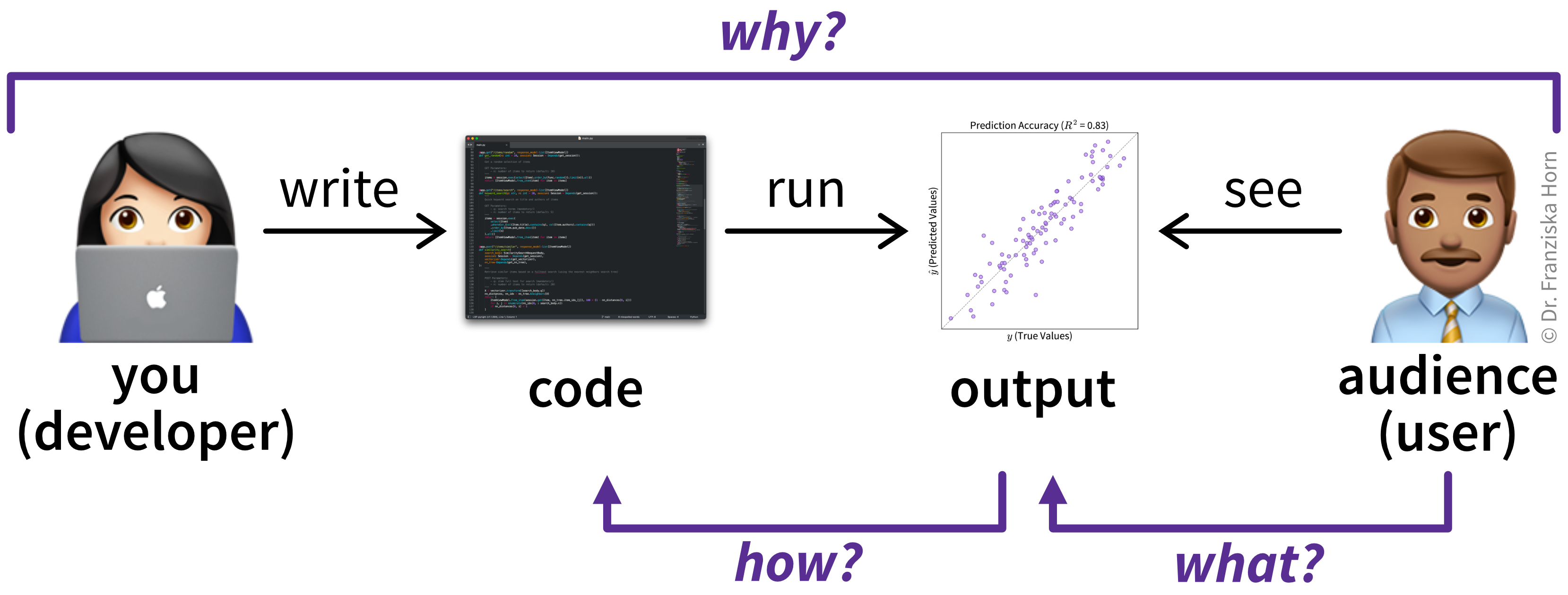
Working through these questions forces you to confront gaps in your understanding. I refer to the resulting documents that capture your answers as sketches, since they provide a rough but intentional outline of the system to be built. However, the main goal is gaining clarity through the thinking process, not producing detailed documentation—so these sketches are far lighter than full requirements or formal specifications and still require a generous dose of sound judgment from a capable engineer to turn them into working software.
In the following sections, I’ll walk through what answering these questions looks like in practice. I’ll use an example from the domain of predictive quality—more complex than some toy To-Do app, but familiar enough for me to confidently evaluate the results. The example draws on my prior work at BASF (the chemical company) and at alcemy, a climate tech startup applying machine learning to optimize cement recipes and reduce CO₂ emissions. Since this example is illustrative rather than commercial, I’ll deliberately skip some details, which I’ll return to at the end of the article.
A related approach that has gained traction recently is Spec-Driven Development (SDD), which emphasizes detailed specifications, plans, and task breakdowns, often produced with AI support. However, I’m not convinced we should treat those specs—rather than the working code—as the source of truth. In the end, both describe your system, but the code is naturally more precise. And as an industry, we have moved away from hundred-page requirement documents towards more lightweight user stories for a reason.
CDD instead encourages you to create just enough documentation for you and your collaborators—human and AI—to understand the problem and the conceptual solution. It prioritizes thinking over formal specifications, with sketches serving as tools for gaining clarity rather than documents to maintain.
The Why
The first question we need to answer is why our idea is worth implementing in the first place. This comes down to why users would be better off with our software than with the alternatives—whether those alternatives are competing products, spreadsheets, or no software whatsoever. Identifying a gap in the current solution-landscape requires knowing who our target users are (e.g., by creating user personas) and what is important to them. Their priorities might be related to specific functionality, usability, aesthetics, or anything else that helps them perform their job better and improve the metrics by which their work is evaluated.
If your team includes a product manager / owner, they should be able to help you with these points.
Predictive Quality Example
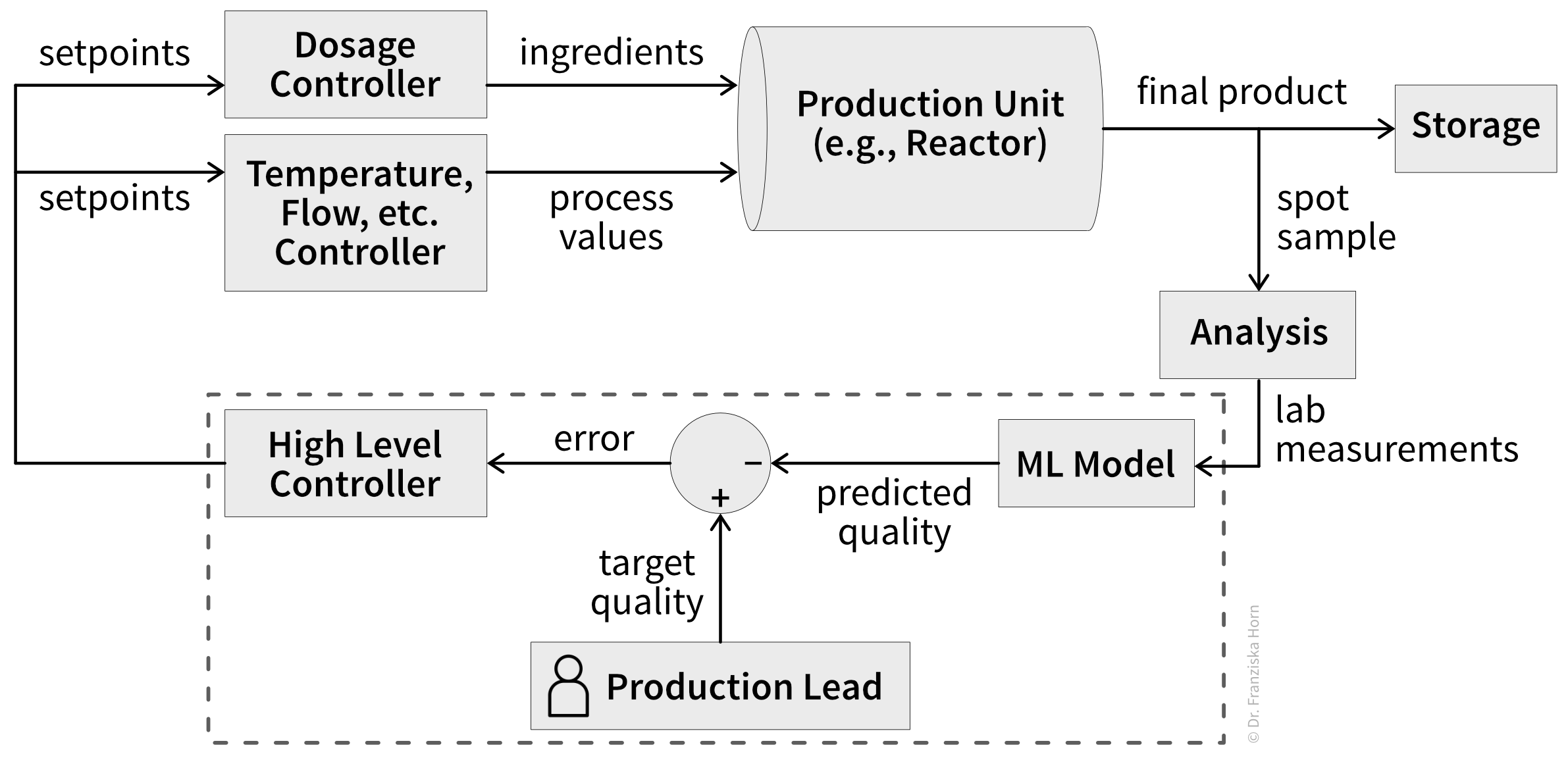
A common challenge in process industries like chemical or cement production is maintaining product quality despite changing conditions like fluctuating raw material quality, process degradation (e.g., catalyst depletion), and other latent factors. This requires the production lead (= our target user) to constantly adjust setpoints using heuristics to keep quality on target while maintaining throughput and managing energy costs and other resources (= their key priorities).
What makes determining the right setpoints especially difficult is that actual product quality often isn’t known until hours or days later, since quality tests can be very time-intensive. For example, for cement, compressive strength can only be measured after a block hardens for 28 days. This means despite the production lead’s best efforts to adjust setpoints, they may discover days later that their entire production run fell below quality standards—when it’s too late to correct.
By using a machine learning (ML) model to predict final product quality from readily available lab measurements, near-real-time process control becomes possible (Figure 4). Setpoints can then be automatically determined to maintain stable quality while additionally optimizing secondary metrics like throughput and resource consumption. This frees the production lead to focus on more creative work like tweaking recipes, developing improved product variations, or optimizing the overall production process.
The What
In the next step, we need to examine what our implementation should look like to users. This typically means creating wireframes and user interface mockups, and—ideally—testing them with potential users to see where they struggle. These mockups make assumptions about user workflows explicit and often expose misunderstandings about the problem itself.
While tools like Google’s Stitch can generate polished mockups in seconds using AI, personally I prefer simple pencil-and-paper sketches (which, it turns out, AI coding assistants can also interpret surprisingly well). That said, input from a UX designer is invaluable here. And when designs already exist, it’s worth understanding why they make sense and how exactly they address user needs.
Predictive Quality Example
The envisioned predictive quality software is primarily a data product. At its core is an ML model acting as a soft sensor for product quality. However, reliable predictions alone aren’t sufficient—they must be presented to the production lead in actionable ways through effective data visualizations. This requires understanding what questions production leads need to answer and what decisions they must make.
Key use case scenarios our software should support include:
- Monitoring quality (actual when available, otherwise predicted), throughput, and costs over time
- Reviewing recommended setpoints for maintaining target quality and tracking adherence
- Identifying possible root causes for quality degradation
- Noticing data issues like malfunctioning sensors that might impact ML predictions
- Inspecting ML model accuracy and learned patterns to build trust in its predictions
Additionally, the application requires inputs from the production lead, such as configuring recipes for all product variants they produce.
Each of these use cases translates into one or more screens. For each screen, I created a wireframe and a brief description of the screen, including which backend endpoints it should communicate with to read or write the required data (finalized in the next step). For example, the resulting sketches for the quality monitoring view are shown in Figure TODO, while sketches for other screens can be found in the project’s GitHub repo (TODO: link).The How
Finally, we need to ponder how we could best implement this solution. This includes designing interfaces, data structures, and flows. Specifically, this means defining the inputs and outputs of major endpoints or scripts and outlining the database schema. If possible, these sketches should then be discussed with a more experienced software engineer or architect to identify potential issues before they are implemented.
I usually begin by identifying the API endpoints required to support the user experience (outlined in the previous step), based on the data needs revealed by each screen’s mockup (i.e., any functionality triggered through a user action, like navigating to a page or submitting a form). Next, I determine which additional processes are needed to support these endpoints, such as batch jobs for data processing or other functionality triggered through time-based events (e.g., when a new measurement comes in every 10 minutes).
For each relevant interface, I note down:
- module or file path
- function or class name and possibly endpoint route
- purpose (high-level description of the provided functionality, if not obvious from the name)
- input arguments & return values (name, type, brief description)
- pseudocode of the implementation (for more complex control flows, e.g., edge case handling, invariants, and side effects)
To get a better idea of what the resulting software design would look like, I use my custom-built tool ArchGraph to turn the plain-text description of my code-to-be into an interactive visualization of the submodules and their dependencies.
From the inputs and outputs of the main endpoints and scripts, I then derive what data needs to be persisted. When defining the database schema, I aim to balance normalization (avoiding redundant entries through related tables with foreign keys) against query simplicity (avoiding excessive joins and complicated subqueries). You can use drawDB to model the schema visually and export the corresponding SQL, which is excellent input for an AI generating ORMs or other database-related code.
Predictive Quality Example
Based on the screens and their data needs identified in the previous step, most required endpoints are already clear. Additionally, we need some batch jobs: regular scripts that handle data cleaning and retrain prediction models weekly on newly collected data. Detailed descriptions of these endpoints and scripts can be found on GitHub (TODO: link).
Finally, we need to determine how data for our application, including trained models, should be structured and stored. The database schema I came up with for this software is shown in Figure TODO.At this stage, our results are independent of any specific programming language or technology choices. That makes them cheap in the sense that no hard-to-reverse decisions have been made yet. Which also means now is a good opportunity—if you haven’t already—to share your idea and sketches with others (human and/or AI) and gather feedback before committing to an implementation built on a potentially flawed design.
Thinking through a problem and solution in this way has always been the fun part for me. In the past, I’d often stop here—once the application “worked in my head,” the challenge was essentially over, and turning my sketches into code just felt like a chore. Fortunately, that tedious work can now be offloaded to an AI that won’t get bored so easily.
Implementing with AI
Now that we have clarity on our desired destination, we’re ready to let AI take the driver’s seat.
The workflow descriptions below are kept deliberately high-level. Concrete tips tend to become obsolete almost as soon as they’re written, given how fast AI models evolve. If you want detailed, tactical advice, just search for “prompt engineering.” For example, the best practices provided by Anthropic are a good starting point.
For a more general introduction, I really enjoyed the book Vibe Coding by Gene Kim and Steve Yegge—even though the title is a bit unfortunate, given that they advocate for a much more rigorous approach that would be better described by “agentic engineering”.
Up-front Decisions
Every project starts with a set of structural decisions: programming language, codebase layout, tools, deployment strategy, patterns, framework choices, and so on. I often chat with an AI to think these through, get initial suggestions, and weigh trade-offs.
For example, I usually work in Python, so for a web app I would normally default to using Streamlit (despite all its flaws) to get something working quickly. For this project, though, I wanted something more production-ready and challenging, and decided to build a proper frontend using a JavaScript framework. So I asked an AI whether React or Angular would be more appropriate for my use case (Figure 5).
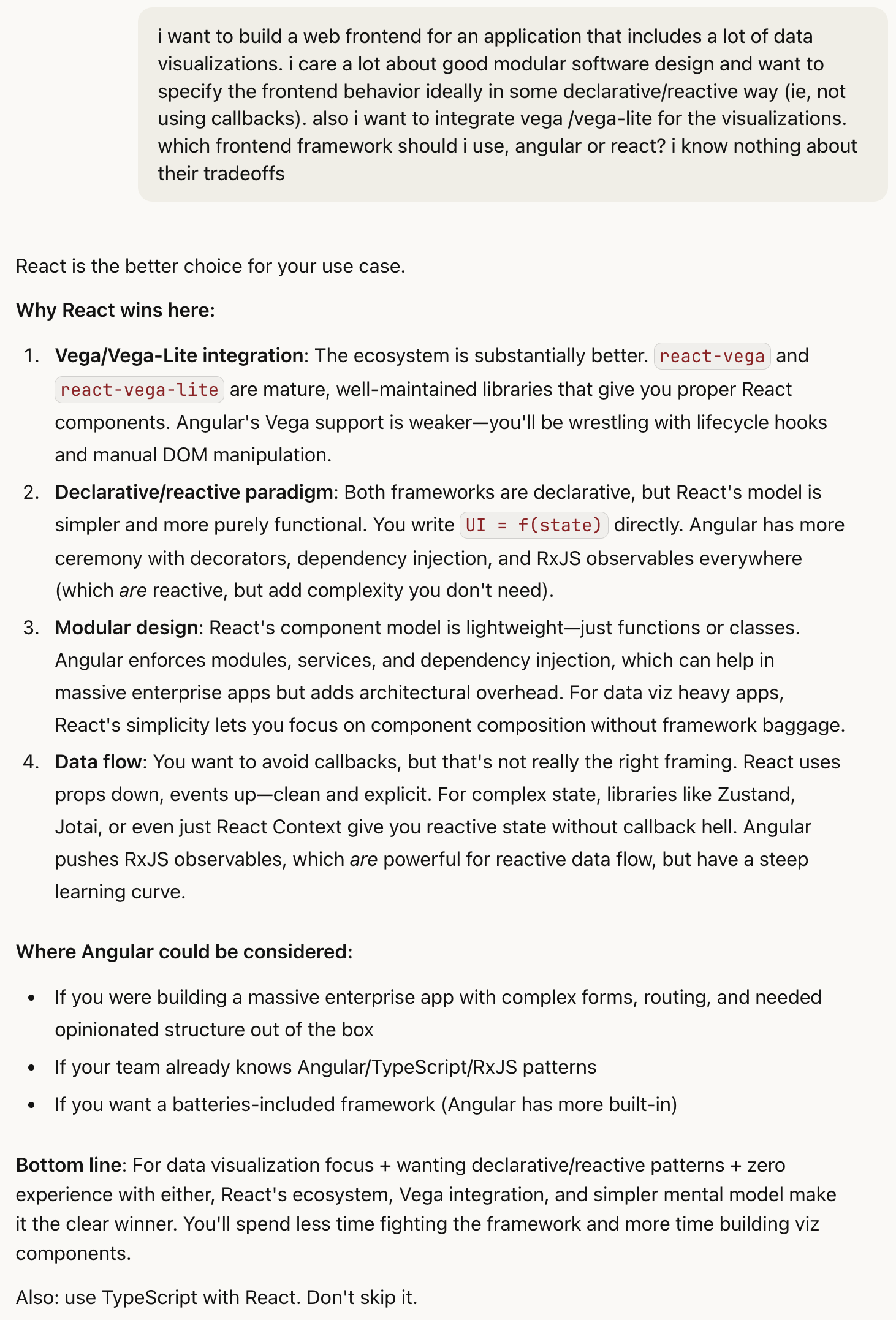
The arguments for React sound reasonable, though of course I don’t have enough frontend experience to fully validate them. However, had I asked an experienced web developer for their recommendation, their answer might also be biased, shaped by personal framework preferences and not necessarily tuned to my specific constraints.
Because the training data behind most LLMs is typically a few months out of date, they miss recent advances and may recommend frameworks or tooling that are no longer current. You often need to explicitly tell the AI to search the web for the latest state of the art, and you should also keep up with developments in your field so you can recognize when its recommendations are outdated.
Of course, knowing which trade-offs matter, and identifying the system’s constraints in the first place, is a skill that comes with experience. If you’re not sure which factors might be relevant for your use case, you can also tell the AI to first ask you some questions before making a recommendation. In any case, using an AI to help with architectural decisions is almost certainly better than simply adopting whatever technology happens to be the latest shiny thing.
But please note: since LLMs are probabilistic models, your results may vary. I’ve found the following general instructions1 very helpful to improve answer quality:
Tell it like it is; don’t sugar-coat responses. Take a forward-thinking view. Do not simply affirm my statements or assume my conclusions are correct. Your goal is to be an intellectual sparring partner, not just an agreeable assistant. Where necessary, question my assumptions and provide counterpoints / alternative perspectives to make sure my reasoning holds up under scrutiny and there are now gaps or flaws in my argument. Correct me where I’m wrong.
Encode Decisions in Agent Context
The choices you’ve made up to now are crucial context for everyone working on this project. If you’re lucky, your team is already in the habit of tracking them in architectural decision records (ADRs). But often this knowledge exists only in people’s heads. When collaborating with an AI agent, it is critical that you document this information in writing—and do so concisely to reduce token consumption. An AGENTS.md file2 is perfect for this to ensure the instructions are passed to the LLM in every conversation.
For example, my AGENTS.md file for this project (TODO: add link) includes
- a project overview derived from the CDD “why” sketches
- a description of the project structure (software architecture and how it’s reflected in the directory organization) and which technologies and frameworks are used (incl. specific versions where necessary)
- style guidelines reflecting what I consider good code
- instructions how the agent should interact with the codebase (e.g., using the
tytype checker instead of the former defaultmypyfor Python—another example where specific hints are necessary when your project setup deviates from the mainstream conventions the AI encountered in its training data) - a checklist outlining the desired agent workflow (e.g., ask questions if anything is unclear, write tests before the implementation, make sure type checker, linter, and all tests pass)
However, this is very much a living document—whenever the AI does something stupid, I’ll revise the instructions to improve the likelihood of better results in future runs.
Coding
Now for the implementation itself, my AI-assisted coding setup is actually really basic. I’m not (yet 😉) running a swarm of sub-agents overnight to parallelize tasks, review pull requests, and hand me a finished app the next morning. Partly that’s because I still have enough trust issues and would rather supervise the development step by step. But if we’re being honest, it’s also because I haven’t yet had the patience to dive this deep into the fast-moving ecosystem of AI agents and tooling (how many VS Code clones with AI integration do we have now?!) and prefer to wait until the approaches that actually prove themselves get absorbed into the mainstream tools.
So what I actually use is the Zed IDE, built from the start with AI-assisted coding in mind and driving recent standards like the agent client protocol, together with Claude Agent. I use Claude models from an IDE rather than as a CLI tool, because I really appreciate a thoughtful GUI, for example, to review the agent’s code changes. I selected Claude based on some preliminary experiments comparing different AI models and because Anthropic has set the standard for innovation in coding agents, while other companies mainly scrambled to keep up.
TODO: add screenshot of IDE
After all the preparations to gain clarity on what we want to build, implementing the system is now fairly straightforward. Or as Bent Flyvbjerg argues in How Big Things Get Done: a solid, well-thought-out plan gets you halfway to smooth execution and delivery.
Essentially, I just point the AI at my sketch documents and ask it to draft an implementation plan, presenting trade-offs for different options and asking clarifying questions. After potentially revising this plan together, I let it execute the steps to implement the project. Along the way, I follow some best practices:
- Switch threads regularly. To avoid “context rot”, where results deteriorate as the context window fills and earlier instructions get compressed or forgotten, I start a fresh thread for each new task. This also helps conserve tokens, since longer threads mean more context is resent with every prompt, which can quickly eat through your usage limit.
- Close the feedback loop. Like human developers, agents often don’t produce perfect code on the first try. I enable the agent to use build tools, linters, and a thorough test suite (by asking it to write tests first when implementing new features) so it can identify failures and self-correct before declaring a task done. Additionally, you should instruct the agent at the end of every task to critique its own work (“What’s missing so a senior developer could be truly proud of this implementation?” or “Based on everything you know now, how could this implementation be simplified?”) to squeeze out further improvements.
- Maintain modular architecture. As the codebase grows, good modularity ensures the agent knows where to find relevant files without polluting its context window with irrelevant code.
Even with solid instructions, the implementation process remains iterative. Sketches inevitably contain gaps that only surface during implementation and you only really know what you actually wanted once you see the working software and can interact with its features—agile is not dead. In principle, you could then go back, update the sketch documents, and generate a new prompt from the diff. In practice, I usually find it faster to ask the AI to fix the issue directly and archive the sketches once they’ve been implemented.
The Result
The sketches have now served their purpose: they helped me think through a coherent solution before writing code. Moving forward, the working software will be my source of truth. You can check out the code on GitHub and interact with the live application on Render. TODO: The actual implementation took roughly X hours and consumed $X in Claude Code tokens.
TODO: add screenshot of application
Keep in mind this is still a toy project: achieving the first 80% was relatively straightforward, but—as always—the remaining 20% (or likely a lot more in this case) is where the real challenges lie. From my experience at alcemy, just a few of the critical components missing for a production-ready system include:
- User management, roles & permissions, authentication, and other security considerations.
- Automated, continuous ingestion of new data from last-century data management systems.
- An ML model that delivers reliable predictions despite measurement errors and changing latent conditions—a challenge that usually requires integrating deep domain knowledge through feature engineering and hybrid models that combine data-driven approaches with a mechanistic understanding of the underlying processes.
- Production operations: provisioning infrastructure, observability, handling ongoing data issues, regular model retraining, and adapting to new edge cases.
- Change management: ensuring users adopt and ideally enjoy using your product.
Most of these points require substantial human creativity, domain expertise, and empathy for users.
Where to Go From Here
The most important advice that I can give you for AI-assisted coding—beyond thinking through and clearly defining what you want to build—is to keep experimenting. It takes practice to discover which prompts work and when the AI goes off the rails. And then you’ll need to relearn this again every few months as new models and tools appear. But it’s also fun to keep being positively surprised by your new AI colleague and see how it can amplify your creativity and handle the tedious tasks, letting you focus on the ideas that matter.
Footnotes
This is an additional prompt that is automatically injected at the start of every conversation, before the actual user prompt. Depending on how you use the AI, this can be set in personal preferences (for web interfaces) or in a conventions file such as an
AGENTS.md.↩︎At the time of writing,
AGENTS.mdis unfortunately not yet a universally accepted standard across IDEs and coding agents, which is problematic when collaborating with people using different setups. In my case, I work around this by referencing@AGENTS.mdfrom myCLAUDE.mdfile so Claude Code reliably picks up the instructions. Ideally, this won’t be necessary in the future.↩︎